

MATC Gmail Help
When you become a student at MATC, you will recieve information about your MATC network account including your college email address. Your MATC Gmail account will be your official and primary means of communication in your courses and all college services. Check this account regularly for important announcements!
What is My MATC Gmail Address?
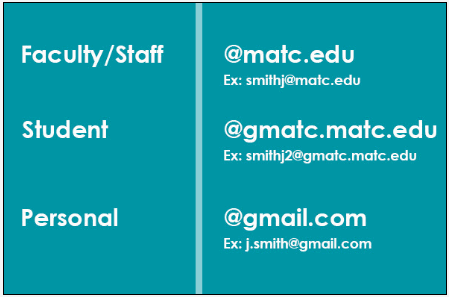
Your address will be your MATC network account username@gmatc.matc.edu. This is different than the type of address given to faculty or your personal Gmail account. If you have a personal Gmail account, you may toggle between your personal Gmail and MATC Gmail inboxes using these instructions.
How Do I Access My MATC Gmail?
Once you recieve your MATC Network username and password, you may log into the MATC Portal to access your MATC Gmail. See the MATC Library's Gmail FAQ for details. If you do not remember what your login is, go to the Online Password Manager and use the "Forgotten Username" or "Forgotten Password" links.
How Do I Use Gmail?
If you are unfamiliar with using Gmail, view the Quick Start video and provided resources.
If you would like to receive email notifications from Rave Alert and Blackboard, please see these tutorials:
What are Google Apps?
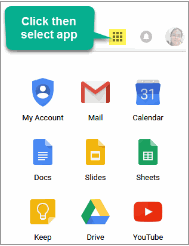
When you are logged into your MATC Gmail, you will have access to set of free tools called Google Apps. These are web-based, mobile-friendly tools that you can use to take notes, create study schedules, collaborate with classmates, and more. When you are logged into your MATC Gmail, click on the apps icon in the top-right corner of the screen to view and access Google Apps.
Recommended Apps to Support Your Learning
- Google Calendar - For creating a personal study schedule and to manage your time.
- Google Keep - A handy note-taking tool and reminder system.
- Google Docs - A web-based word-processing program with built-in collaboration tools.
- YouTube - Search for video tutorials, presentations, or playlists to support your learning of difficult concepts.
Password Management & Expiration
Your myMATC acccount's password will expire and must be changed every 180 days. You will receive an email at your MATC Gmail account warning you at 15 days, 5 days and 3 days. You may use the online Password Manager to change your password or call the Help Desk at 414-297-6541 for assistance.
How Do I Fix a Login Problem?
Call the Help Desk at (414) 297-6541 or use the Online Password Manager to retrieve or reset your username and password.
Troubleshooting Tips
- If you have your own personal Gmail account, make sure that you log out of it before accessing your MATC Gmail through the MATC Portal. Or, review these instructions to toggle between accounts.
- If you have difficulty finding messages in your Gmail, turn off your Gmail's Conversation View and use your Gmail Search tools.
- Check your Gmail's Spam folder for course-related messages sent from your instructor and mark them as "Not Spam".
- To sort and organize messages in your Gmail, use Gmail Labels. In Gmail, labels are like folders.